In an App
In this Article:
Configure ECAL Button
- Create an ECAL Account and a new Button Display
- Log into your ECAL Account and follow the prompts in the ‘Getting Started Guide’ to create and configure a new Button Display
- Once created, ensure your button is set to ‘Live’
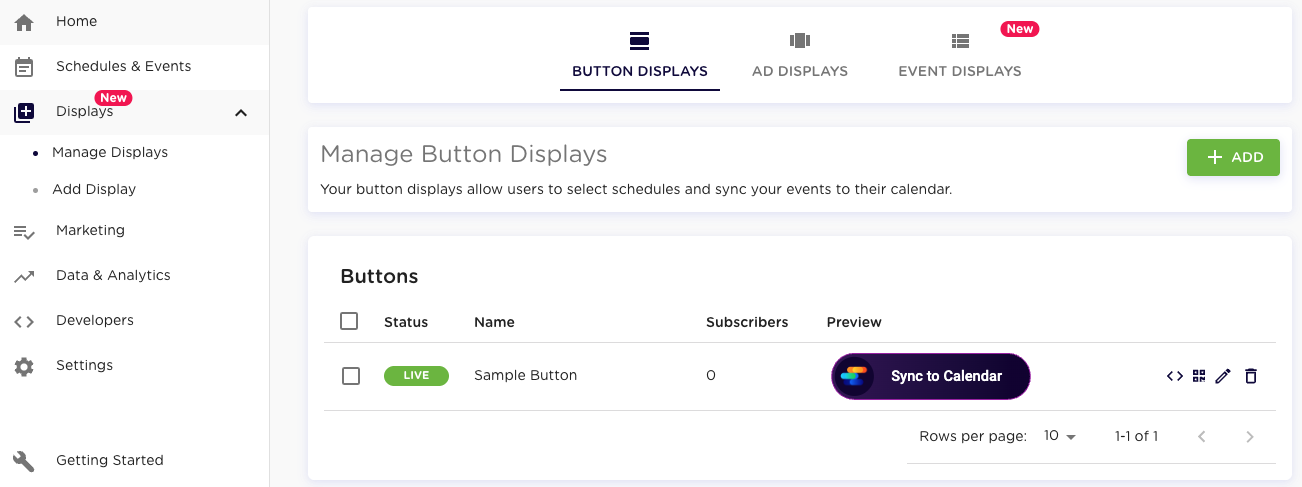
- Configure Button Display and allow Users to subscribe
- Publish your ECAL ‘Sync to Calendar’ Button
- Once created, ensure your button is set to ‘Live’
Configure Direct Link
- Click on the ‘Button Code’ in Button Display and make a note of:
- Widget ID
- API Key
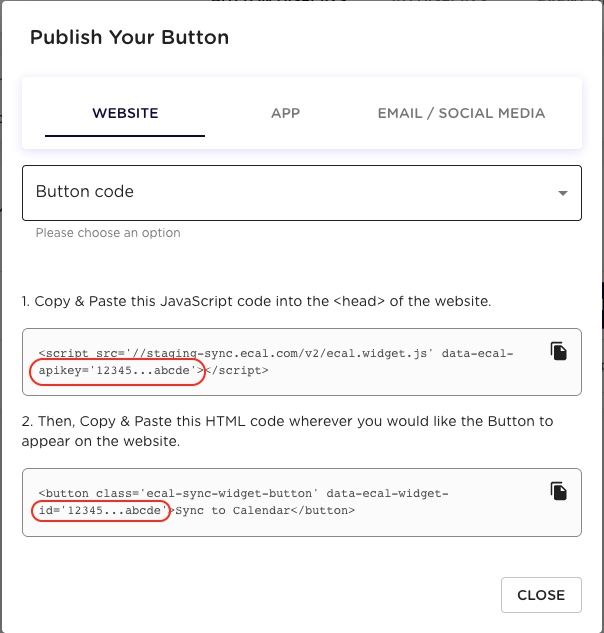
- Replace the placeholders in the link below
https://sync.ecal.com/schedules?apiKey=INSERT_YOUR_API_KEY&widgetId=INSERT_YOUR_WIDGET_ID - See ECAL’s Direct Link API for additional configuration options
Embed Direct Link
OAuth sign-in inside WebView (Android) and WKWebView (iOS) can be blocked by providers due to policy mismatch or restrictions.
The host app can intercept credentials and the user has no visible domain to trust. Use a sandboxed browser component that shares the device’s existing session and exposes a URL bar.
For more information check the following links:
- iOS: SFSafariViewController
- Android: CustomTabs
Disclaimer: The code samples below demonstrate the correct integration pattern only. They are not complete or production-ready — adapt code, error handling, dependency versions, theming, and lifecycle management to your app’s requirements.
Use Chrome Custom Tabs (androidx.browser). Do not use WebView.
build.gradle (app module)
dependencies {
    implementation "androidx.browser:browser:1.8.0"
}
Open the link
import android.net.Uri
import androidx.browser.customtabs.CustomTabColorSchemeParams
import androidx.browser.customtabs.CustomTabsIntent
import androidx.core.content.ContextCompat

fun openEcal(activity: AppCompatActivity) {
    val url = Uri.parse(
        "https://sync.ecal.com/schedules" +
        "?apiKey=YOUR_API_KEY" +
        "&widgetId=YOUR_WIDGET_ID"
    )

    val colorParams = CustomTabColorSchemeParams.Builder()
        .setToolbarColor(ContextCompat.getColor(activity, R.color.colorPrimary))
        .build()

    CustomTabsIntent.Builder()
        .setDefaultColorSchemeParams(colorParams)
        .setShowTitle(true)
        .build()
        .launchUrl(activity, url) // use launchUrl(), not WebView.loadUrl()
}
Fallback — when no Custom Tab provider is available (e.g. some Huawei devices), fall back to the system browser. Do not fall back to WebView.
Add this to AndroidManifest.xml (required on Android 11+ for resolveActivity to see installed browsers):
<queries>
    <intent>
        <action android:name="android.intent.action.VIEW" />
        <data android:scheme="https" />
    </intent>
</queries>
import android.content.Intent
import android.net.Uri
import androidx.browser.customtabs.CustomTabsIntent

fun openEcalSafely(activity: AppCompatActivity, url: String) {
    val uri = Uri.parse(url)
    val hasBrowser = activity.packageManager
        .resolveActivity(Intent(Intent.ACTION_VIEW, Uri.parse("https://")), 0) != null

    if (hasBrowser) {
        CustomTabsIntent.Builder().build().launchUrl(activity, uri)
    } else {
        activity.startActivity(Intent(Intent.ACTION_VIEW, uri))
    }
}
Use SFSafariViewController. Do not use WKWebView or UIWebView.
UIKit
import UIKit
import SafariServices

class CalendarViewController: UIViewController {

    @IBAction func openEcalTapped(_ sender: UIButton) {
        guard let url = URL(string:
            "https://sync.ecal.com/schedules" +
            "?apiKey=YOUR_API_KEY" +
            "&widgetId=YOUR_WIDGET_ID"
        ) else { return }

        let safariVC = SFSafariViewController(url: url)
        safariVC.preferredControlTintColor = UIColor(named: "BrandColor") ?? .systemBlue
        safariVC.delegate = self

        present(safariVC, animated: true) // must be modal — do not push onto UINavigationController
    }
}

extension CalendarViewController: SFSafariViewControllerDelegate {
    func safariViewControllerDidFinish(_ controller: SFSafariViewController) {
        // dismissed — refresh subscription state if needed
    }
}
SwiftUI
import SwiftUI
import SafariServices

struct SafariBrowser: UIViewControllerRepresentable {
    let url: URL
    func makeUIViewController(context: Context) -> SFSafariViewController {
        SFSafariViewController(url: url)
    }
    func updateUIViewController(_ uiViewController: SFSafariViewController, context: Context) {}
}

struct ContentView: View {
    @State private var showEcal = false

    var body: some View {
        Button("Sync to Calendar") { showEcal = true }
            .sheet(isPresented: $showEcal) {
                SafariBrowser(url: URL(string:
                    "https://sync.ecal.com/schedules?apiKey=YOUR_API_KEY&widgetId=YOUR_WIDGET_ID"
                )!)
            }
    }
}
Do Not
- Use
WebView(Android) orWKWebView/UIWebView(iOS) — Google OAuth will be blocked regardless of any other configuration. - Override or strip the User-Agent on a Custom Tab — Google detects non-standard UAs and may block the request.
- Push
SFSafariViewControlleronto aUINavigationController— this crashes at runtime. It must be presented modally. - Fall back to
WebViewwhen Custom Tabs are unavailable — useIntent(ACTION_VIEW)to hand off to the system browser instead. - Use
ASWebAuthenticationSession— this is for headless OAuth token flows, not full-page flows.